
3D AI game maker: make 3D games by describing them
A 3D AI game maker should get you from an idea to something you can walk around in. Shiny Gen builds 3D games from a description on the Godot engine, or on an N64-class engine for retro 3D, and gives you a built-in 3D editor for the models and worlds. It runs in your browser.
Free to make, play, and share. AI generation uses gems.
Where your 3D game runs
Godot, in the browser
Games are written in real GDScript on our Godot build, which has a WebGPU renderer. The whole engine runs in the browser with nothing to install, so a 3D game is a link you can send. You can also export it for the web as a zip you host anywhere (any one purchase, from $2.99).
N64, GameCube, and DS engines
For retro-style 3D, the N64 engine is an N64-class engine we wrote, with its own RSP microcode, and there are GameCube and DS engines too. They compile games into a ROM, a .dol, or a .nds file, within the limits of those consoles. They are not emulators.
All six engines are explained on the engines page.
How a 3D game gets made
- Describe it. "A low-poly river raft game. Hold left or right to paddle. Rocks knock planks loose." Pick the Godot engine and send it to the Agent.
- The AI builds and tests it. The agent writes the game, runs it, takes screenshots, presses the controls, and fixes errors, so you start from something that runs.
- Shape the 3D content. Open the 3D editor to build and edit meshes, entities, and worlds, or generate and edit images with AI and turn them into entities in a 3D world.
- Keep going by chat. Ask for a new level, a camera change, or a faster enemy. Share a link when it plays right.
3D games from the catalogue
Play any of these without an account, then remix one into your own copy. Retro 3D games run at the resolution of the console they are made for.
- Godot, 3D
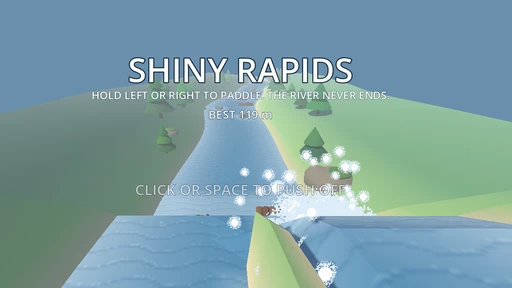
Shiny Rapids
Paddle a raft down a river that never ends; rocks and logs throw your passenger overboard.
 N64 engine
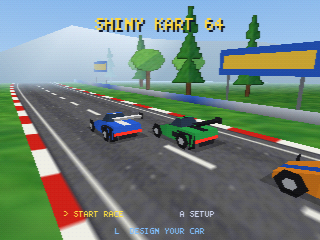
Shiny Kart 64
Six cars, three tracks, three laps, with CPU drivers that draft and pass.
 N64 engine
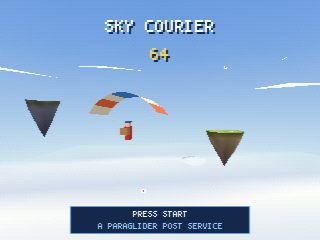
Sky Courier 64
Ride rising air between seven floating islands and deliver 24 parcels.
 N64 engine
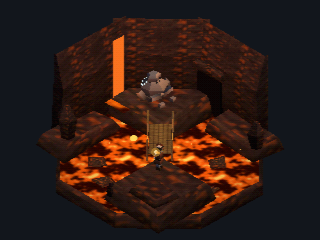
Volcano Crater
A crater of lava with a rope bridge and a cave mouth. Drag to turn it, pinch to zoom.
 N64 engine
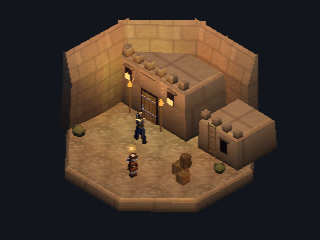
Desert Fortress
A walled yard at night with torches, a gate, and a spearwoman walking her beat.
 N64 engine
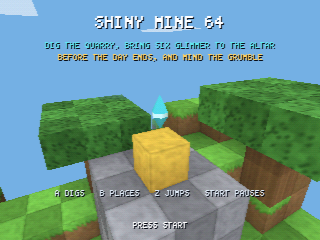
Shiny Mine 64
Dig a blocky 3D quarry and bring stone to the altar before the day ends.
 N64 engine
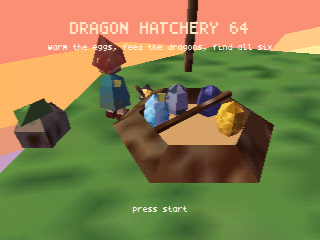
Dragon Hatchery 64
Warm speckled eggs with your lantern until little dragons tumble out.
 N64 engine
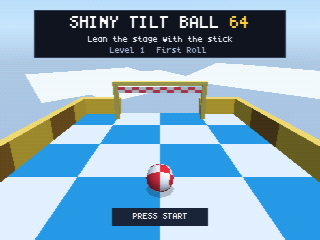
Shiny Tilt Ball 64
Lean the whole stage with the stick and roll the checkered ball through the gate.
 DS engine
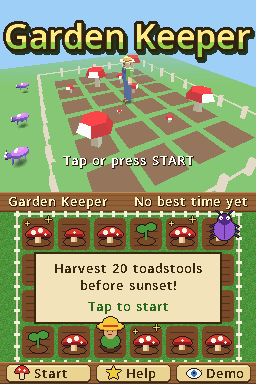
Garden Keeper
The garden is in 3D on the top screen; tap plots on the touch screen to sow.
What is in the 3D toolkit
| Tool | What it does |
|---|---|
| 3D model editor | Build and edit meshes, entities, and 3D worlds |
| Image editor | Generate and edit images and sprites with AI, then go straight to creating entities in a 3D world |
| Animation | Generate sprite animations with video models |
| Audio | Generate sound effects and music as editable scores |
| Agent | Writes and fixes the game, and plays it to check |
3D on a phone
The same editor and agent are in the iPhone, iPad, and Android apps, in 17 languages.


Questions about the 3D AI game maker
What is a 3D AI game maker?
A tool where you describe a 3D game and an AI builds it, instead of you modelling and coding everything first. In Shiny Gen the agent writes the game, runs it, and fixes errors, and you shape the 3D content with a built-in editor.
Which engine makes the 3D games?
The Godot engine, in a build we made with a WebGPU renderer, for 3D games that play in the browser and the apps. For retro-style 3D there are the N64, GameCube, and DS engines, which work within those consoles' limits.
Can I edit the 3D models myself?
Yes. The built-in 3D editor lets you build and edit meshes, entities, and 3D worlds by hand. You can also go from the image editor straight to creating entities in a 3D world.
Do I need to install anything?
No. The whole engine and the editors run in your browser. The first load is about 17 MB. There are also iPhone, iPad, and Android apps.
Can I open the project in the regular Godot editor?
No. The games run on Shiny Gen's own Godot build with extra features, so the project does not open in the stock desktop Godot editor. The code is real GDScript you can read and edit in the app.
Is it free?
You can make, play, and share for free. AI generation spends gems: you start with free gems and a few free AI turns, then get one free AI prompt each day, and gem packs start at $2.99.
Can I make a 3D game for the N64?
Yes. The N64 engine is an N64-class engine we wrote, including our own RSP microcode. You can export a ROM (any one purchase, from $2.99). It has been tested in an emulator, not yet on real hardware.
Can the AI make the models and textures too?
It can generate images, edit them with AI, and build 3D content in the editor, and it can generate sound and music. Generation uses gems, and the agent says how many before it spends them.
Build something you can look around in
Describe a 3D game, play what the AI builds, and shape it in the editor.